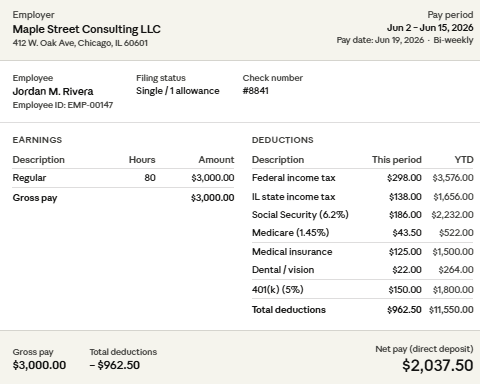
Your pay stub records what you earned, what was withheld, and what you took home. Read it each pay period to verify figures and catch discrepancies in real time.
Below: an abbreviations glossary, a section-by-section reading guide, and a sample stub.
If you run payroll, the employer section offers tips on creating required pay stubs. SurePayroll By Paychex generates pay stubs automatically and gives your team self-service access to their records — no inbox requests required.
You should review each paystub you receive. You may need it for loan applications, rental agreements, or assistance programs. It’s the standard proof of income and employment when you need to verify your earnings.
It also helps you track your hours, stay on top of your deductions, and manage your budget from paycheck to paycheck.
Estimate your paycheck with our free payroll deduction calculator.
Self-employed workers, freelancers, and independent contractors also use pay stubs and pay statements as proof of income for loan applications, rental agreements, and tax filing.
Common abbreviations on paycheck stubs:
Gross Pay (sometimes labeled Gross): Earnings before deductions
Net: Earnings after deductions (also known as take-home pay)
Current: Pay period earnings
YTD: Year-To-Date
REG: Regular hours worked
OT: Overtime hours worked
HOL: Holiday hours worked
VAC: Vacation time paid
SICK or FL: Sick or family leave time paid for
FICA: Employee’s portion of Social Security paid
FICA-MED: Medicare deductions
SWT or Fed: Federal withholding income tax deductions
SWT or State: State Tax withheld
LT or Local Tax: County and/or city tax deductions
WC or Work Comp: Workers’ comp contribution, usually paid by employer
INS or MED: Insurance or medical savings account deductions
Life: Life insurance deductions
401K or Ret: Tax deferred retirement contribution
Garnish: Garnishment being taken from employee’s check due to money owed
Most of these abbreviations refer to deductions, including federal income tax, state tax, local taxes, and other tax withholdings.
The header lists your employee name, employee ID, and company name, along with pay period dates and pay date. Verify your name, confirm the pay period matches the dates you worked, and check your employer’s information is correct.
The earnings section breaks down gross pay, which is your total earnings before any deductions. If you’re an hourly worker, you’ll see your pay rate, number of hours worked, and any overtime hours or other pay types such as holiday or vacation.
Use our free hourly paycheck calculator to estimate take-home pay.
If you’re a salaried worker, you’ll see your pay for the period. Compare this against your records to confirm it captures every hour you worked.
Use our free salary paycheck calculator to estimate take-home pay.
The deductions section is the most detailed part of your stub. Deductions fall into two categories: pre-tax and post-tax.
Pre-tax deductions, like health insurance premiums and 401(k) contributions, can reduce your pay before tax calculations, lowering your taxable income.
Post-tax deductions, such as garnishments or certain voluntary contributions, reduce your pay after tax calculations.
Net pay is your take-home pay. This is what remains after all deductions.
Each line shows two figures: current (this pay period) and YTD (year-to-date since January 1). Track both columns to verify your total earnings and confirm your withholding matches your tax situation.
Here's a sample pay stub. Refer to it to check that yours includes all required information.

Header: Your name, employer's name, pay period dates, and pay date.
Earnings: Your gross pay by type: regular hours, overtime, vacation, and sick time. Each appears separately because they're taxed differently.
Deductions: Pre-tax items like health insurance and 401(k) contributions, followed by taxes (federal, state, and local), then any post-tax deductions such as garnishments.
Net Pay: Your take-home amount for the pay period. Every line also shows a YTD total so you can track your full-year figures.
Your Social Security Number and bank account number should never appear on your pay stub. You should only see the last few digits. If they are printed in full on your paystub, contact your employer.
Deductions vary by state. If something on your pay stub doesn’t look familiar, check the glossary or ask the person who runs payroll for your business. They can tell you what it is and why it’s required.
Most states require pay stubs, and your employees rely on them to verify pay, file taxes, and access financial services.
Include employee information, gross wages, itemized deductions, net pay, and the pay period dates.
State requirements vary. Some mandate specific formats or delivery methods. Retain payroll records for the minimum period set by federal and state law.
SurePayroll handles state-specific formatting and archives records in the system.
Salary Paycheck Calculator
Hourly Paycheck Calculator
Pay stubs document what happened. Running payroll correctly determines what appears on them.
If you're managing payroll manually or switching from a system you've outgrown, the path forward is a service that calculates consistently, files taxes on your schedule, and generates pay stubs automatically, so your team doesn't have to ask for them.
SurePayroll handles payroll, tax filing, and pay stub generation in one system. Your employees get self-service access to their records. You get consistent payroll.
This content is for educational purposes only, is not intended to provide specific legal advice, and should not be used as a substitute for the legal advice of a qualified attorney or other professional. The information may not reflect the most current legal developments, may be changed without notice and is not guaranteed to be complete, correct, or up to date